SSH Session Recording for Audit and Compliance
Pomerium Enterprise
This article describes a use case available to Pomerium Enterprise customers.
Most SSH recording systems make you pay for audit evidence twice: once in access control, again in a bastion, host agent, or forked server that records from the side. Pomerium's model is narrower. The proxy that authenticates an SSH session also records the terminal output for routes where recording is enabled, stores the artifact in your object storage, and leaves OpenSSH on the host untouched. That matters for audit work because the recording stays attached to the same identity and access decision that allowed the session, rather than to a shared account, source IP, or sidecar recorder.
This guide is the operating companion to the Session Recording setup page. Use it when recorded interactive SSH sessions need to become defensible evidence for SOC 2 access monitoring, PCI DSS administrative-access logging, HIPAA audit controls, FedRAMP / NIST 800-53 session audit, or an internal investigation of who accessed which host and what appeared in the terminal.
Do not rely on SSH session recording alone when you need raw client keystrokes, complete command provenance, direct-command capture, SCP / SFTP transfer records, or host-level process telemetry. Pomerium records the PTY output stream, which means what the server echoed back to the user's terminal. Pair it with sudo I/O logging, auditd, EDR, or another host-side control when the audit question is what actually executed rather than what appeared on screen.
How this approach fits
SSH evidence tools answer different questions. Host agents and eBPF integrations see deeper process activity, but require kernel-level deployment on every target. Bastions and legacy PAM session managers centralize SSH through a choke point, but often collapse users behind shared accounts or move the chain of custody into a separate runtime. Mesh and VPN recorders work when every SSH session already enters through that network. Pomerium is the right fit when the access decision already belongs at the proxy: standard SSH clients, no target-host agent, customer-owned object storage, and audit fields tied back to the authenticated user.
Evidence flow
The evidence package should include the recording objects, Pomerium Enterprise access logs, storage provider audit logs, and proof of storage retention and encryption settings.
What Pomerium provides, and what you must configure
Pomerium produces a tamper-evident record of privileged SSH access and a correlatable audit trail. It does not, by itself, satisfy any compliance standard. The guarantees you can attest to depend on how you configure the storage layer and your identity provider. This is a shared-responsibility model:
| Layer | Owner | Responsibility |
|---|---|---|
| SSH proxying, recording, audit-log emission, integrity digests | Pomerium | Capture who did what, emit audit logs, verify digests on every transfer |
| Immutability, encryption, retention, storage audit logs | Cloud storage provider + you | Object lock / retention, encryption keys, provider audit logging |
| Identity, access reviews, evidence collection | You | Least-privilege IAM, playback approvals, periodic evidence export |
Treat everything below as "Pomerium supports this control when the surrounding controls are configured," not "Pomerium is compliant out of the box."
Recorded data is sensitive
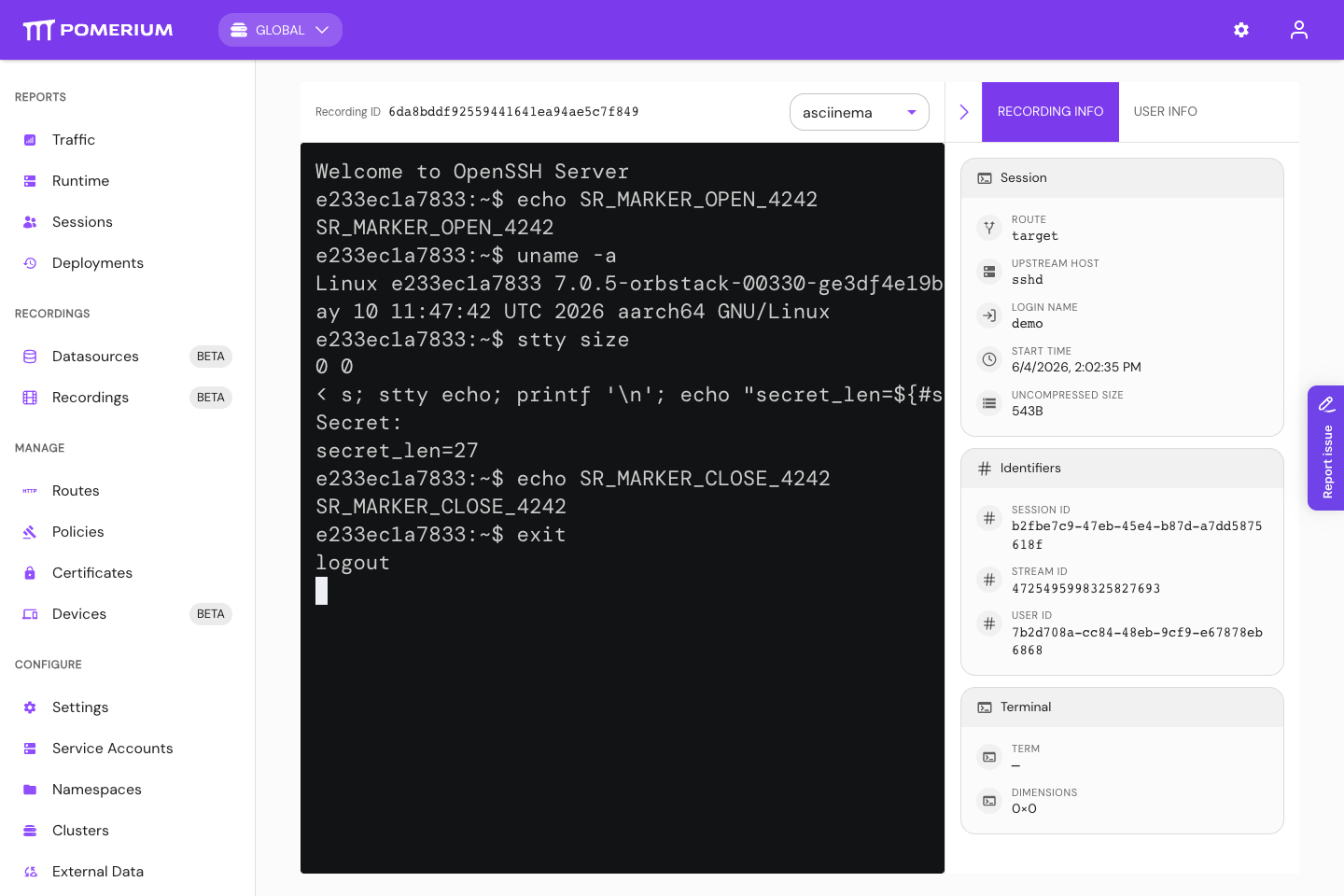
A recording captures everything the user sees in their terminal, unredacted. This can include secrets printed to the screen, file contents, and command output.
Treat that as policy surface, not a footnote. Scope recording to the routes that need evidence, decide who may enable recording and who may play recordings back, and document the limitation that input the server does not echo, such as a password at a sudo prompt, is not captured in the recording.

Immutability: WORM, object lock, and retention
Pomerium's recording path is designed around write-once recording artifacts, and the Enterprise Console only reads them, for playback and download. Do not rely on application behavior alone for regulated evidence. To get a durable guarantee against a compromised credential or an insider, enable object lock and a retention policy on the bucket itself.
- AWS S3
- GCS
- Azure
Enable S3 Object Lock with a default retention period, on a versioned bucket. Compliance mode is appropriate for regulated evidence because retention cannot be shortened or removed by any principal during the retention window; use governance mode for reversible rollout testing. See S3 Object Lock.
How to verify: using a principal that has delete permission (not the least-privilege producer below), attempt to delete a recording object within the retention window and confirm Object Lock rejects it. Deleting as a principal with no delete permission only proves IAM, not immutability.
# 1. Confirm Object Lock is enabled on the bucket
aws s3api get-object-lock-configuration --bucket <recording-bucket>

# 2. Get the object's version ID and confirm it carries retention
aws s3api head-object --bucket <recording-bucket> \
  --key <cluster-id>/ssh/v1/<recording-id>/manifest
# note the "VersionId" in the output

# 3. Try to delete that protected version with a delete-capable principal -- Object Lock must refuse
aws s3api delete-object --bucket <recording-bucket> \
  --key <cluster-id>/ssh/v1/<recording-id>/manifest \
  --version-id <version-id>
# Expected: AccessDenied from object lock / retention. A delete WITHOUT --version-id only
# adds a delete marker on a versioned bucket and does not test immutability.
Apply a retention policy and lock it with Bucket Lock. See Bucket Lock.
How to verify: with a delete-capable principal, run gcloud storage rm on a recording object before the retention period elapses and confirm the retention policy (not IAM) denies it.
gcloud storage buckets describe gs://<recording-bucket> --format="default(retentionPolicy)"
gcloud storage rm gs://<recording-bucket>/<cluster-id>/ssh/v1/<recording-id>/manifest
# Expected: deletion denied by the retention policy until the retention period elapses.
Configure a time-based immutability policy (optionally with legal hold) on the container. See Immutable blob storage.
How to verify: with a delete-capable principal, attempt to delete a recording blob within the retention window and confirm the immutability policy blocks it.
az storage blob delete --account-name <account> --container-name <container> \
  --name <cluster-id>/ssh/v1/<recording-id>/manifest
# Expected: delete blocked by the time-based immutability policy until it expires.
Encryption at rest
Pomerium delegates encryption to the storage layer. The durable control is a bucket default that applies regardless of how the object is written:
- S3: set a bucket default of SSE-KMS with a customer-managed key.
- GCS: set a default customer-managed encryption key (CMEK) on the bucket.
- Azure: configure customer-managed keys in Key Vault for the storage account.
On S3, Pomerium can also specify encryption per request through the bucket URI (ssetype=aws:kms&kmskeyid=...); this per-request option is S3-only. Rely on the bucket default regardless, so nothing can write unencrypted.
How to verify: inspect a recording object's encryption status and confirm it reports your key.
Least-privilege storage access
The producer and the reader should use separate principals. Start from the provider permissions in the storage reference, then reduce them with tested custom roles where your provider supports it:
| Component | Typical access | Notes |
|---|---|---|
| Pomerium Core (producer) | Create/upload plus the read/list access needed to resume and verify writes | It should not need routine object deletion, but provider managed roles may include broader permissions. Test reduced custom roles before production. |
| Pomerium Enterprise (reader) | Read-only access to configured recording buckets | It does not write or delete recordings. |
For AWS S3, treat s3:AbortMultipartUpload separately from s3:DeleteObject; it may be needed for safe cleanup of incomplete multipart uploads even when object deletion is denied.
How to verify: run an upload, resume, playback, and download drill with the reduced roles before production. Confirm object retention denies deletion even if a break-glass or test principal has delete permission.
Audit-log correlation
This is the core of the chain of custody: prove who accessed which recording, and that nothing was accessed outside Pomerium. Pomerium Enterprise emits an audit log on every access, and annotates its requests to the storage provider so the two logs can be matched.
- Enable provider audit logging on the recording bucket.
- GCS
- S3
- Azure
Enable Cloud Audit Logs Data Access (ADMIN_READ, DATA_READ, DATA_WRITE) for storage.googleapis.com on the bucket. Pomerium requests carry the x-goog-custom-audit-pomerium-access-id and x-goog-custom-audit-pomerium-user annotations.
Enable CloudTrail data events and/or S3 server access logging. Pomerium requests carry a pomerium_access_id query parameter and an AWS SDK-sanitized user-agent app token in the rough form app/PomeriumEnterprise-<version>--u-<hmac>--; confirm the exact form against your CloudTrail records.
Enable StorageBlobLogs. Pomerium requests carry a ClientRequestId and a PomeriumEnterprise/... (u=<hmac>) user agent.
-
Correlate. Enterprise audit entries (message
authorize blob read) carry anaccess_id, and every entry with anaccess_idalso carries the matchinguser_hmac_id. Pomerium stamps the same values onto its requests to the storage provider, so the provider log carries them too. Match on theaccess_idto tie a storage access back to a specific user action, and theuser_hmac_idties that action to an identity. -
Preserve correlation across rotation. The
user_hmac_idis derived from the Enterprise shared secret. If you rotate the shared secret, keep the previous secrets so older provider logs remain correlatable.
How to verify, end to end:
- In the Enterprise audit log, find the
authorize blob readevent for the recording and copy itsaccess_id. - Query the cloud-provider storage access log for the same value -- the
pomerium_access_idquery parameter (S3), thex-goog-custom-audit-pomerium-access-idannotation (GCS), or theClientRequestId(Azure). - Confirm the same
user_hmac_idappears on both sides. - Confirm there are no provider data-read entries for recording content or metadata that lack Pomerium's annotation. A provider data-read entry for recording content or metadata with no matching Pomerium
access_id/HMAC is access outside the chain of custody and should be investigated.
Integrity verification
Pomerium verifies a content digest at every hop (recording extension to control plane to object store); an upload fails if any digest disagrees. To detect tampering after the fact, treat any of these as an exception:
- more than one object revision for a recording object (recordings are write-once);
- provider data-read entries for recording content or metadata that lack Pomerium's
access_id/ HMAC annotation; - a Pomerium
access_idor HMAC in the storage log that has no matching Enterprise audit entry.
Access governance for playback
Recordings are scoped per Enterprise namespace and cluster, and only the namespace administrator can view them. Define an approval step for granting playback access, and note that downloads are themselves audited (access_type: download), so playback access is self-documenting.
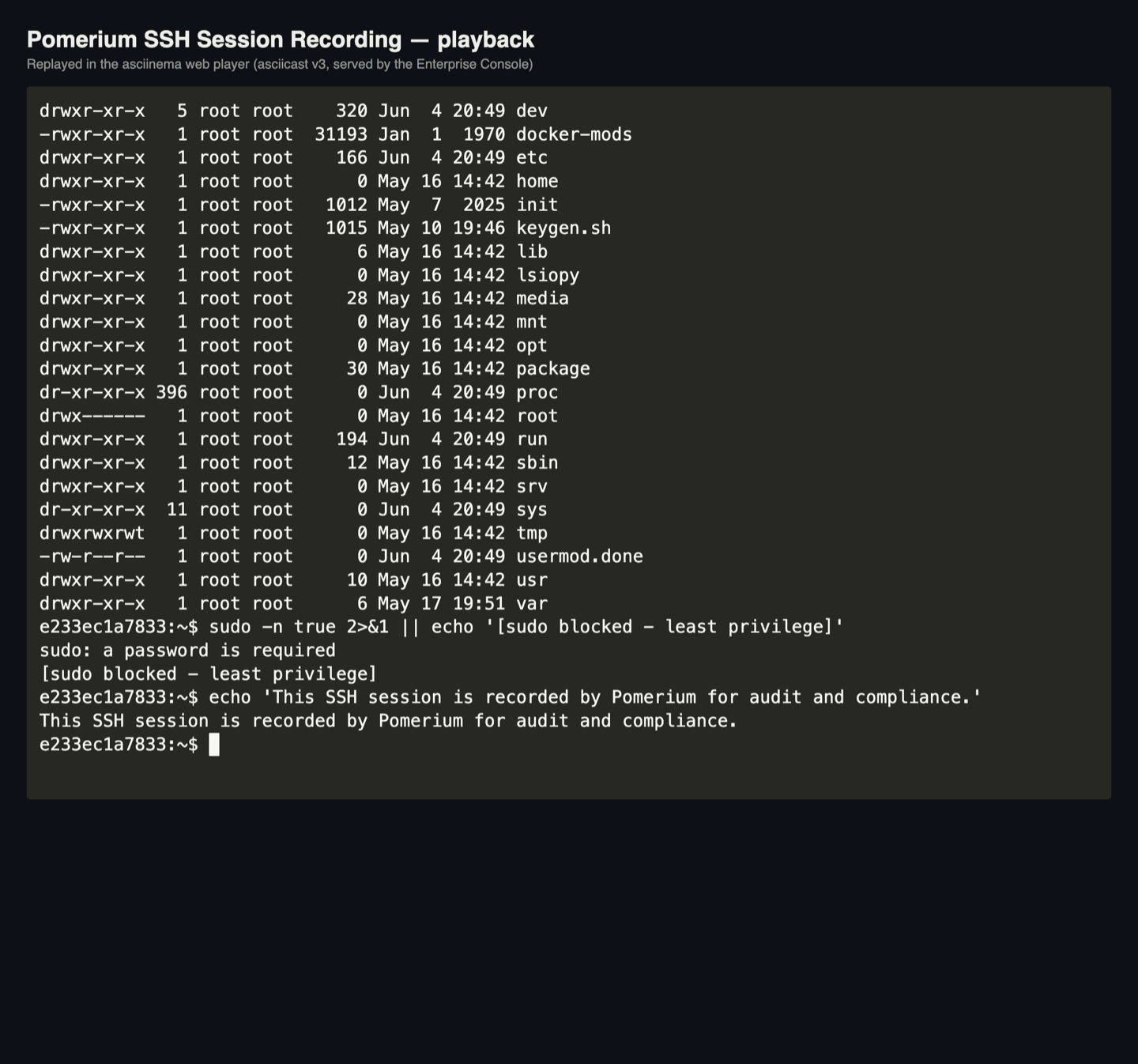
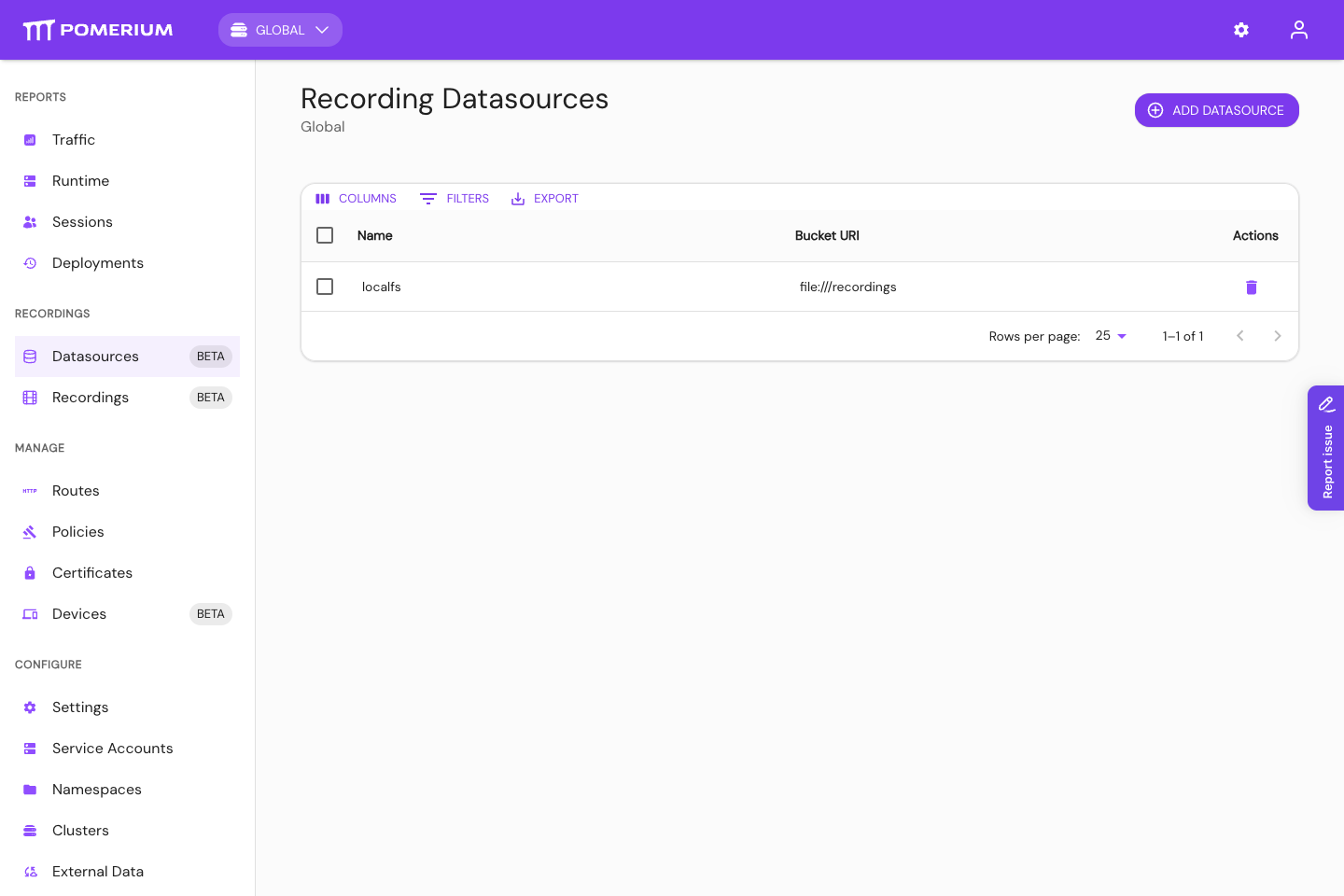
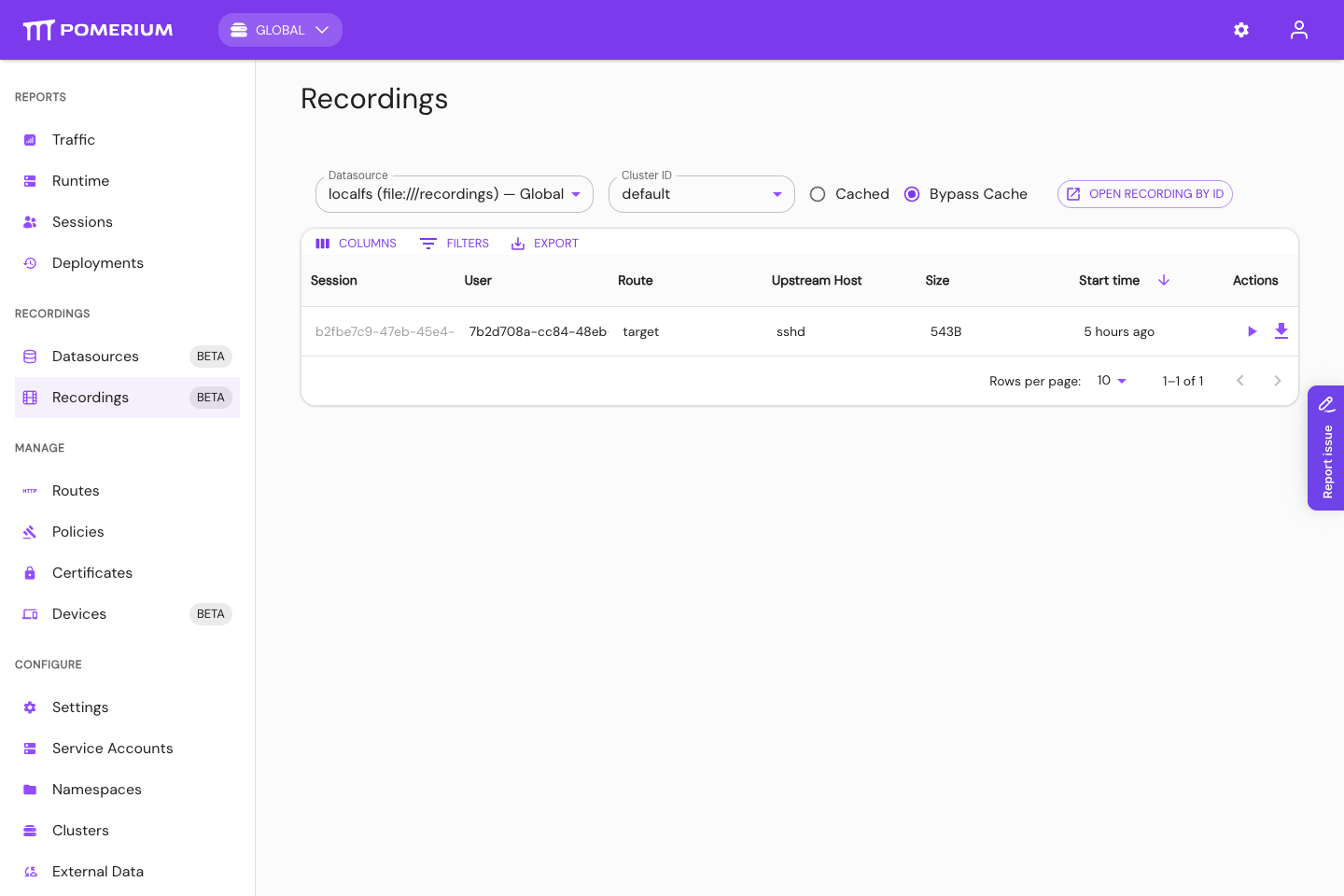
The Enterprise Console shows the configured recording datasource, the recordings available from that datasource, and the in-browser playback view with session metadata.
Auditor evidence bundle
For each session you sample during an audit, collect the following. Most items come straight from the recording's stored objects and the two audit-log sources; together they establish identity, content, and chain of custody.
| Evidence | What it proves | Where to get it |
|---|---|---|
| Recording ID | Stable identifier for the reviewed session | Enterprise Console; object path <cluster-id>/ssh/v1/<recording-id>/ |
| Recording metadata | Start time, SSH login name, route, upstream, Pomerium user and session IDs | metadata.json; Console session details |
| Replayable recording | What appeared in the terminal during the session | Console playback or downloaded <recording-id>.asciicast.json |
| Identity evidence | The session is tied to an authenticated IdP user | Pomerium audit log; IdP |
| Playback / download audit log | Who accessed the recording after capture | Enterprise audit log (authorize blob read, access_type) |
| Cloud storage data-access log | The object was read through the expected Pomerium path | S3 CloudTrail; GCS Data Access logs; Azure StorageBlobLogs |
| Retention / object-lock config | Recordings cannot be deleted or shortened in the retention window | Storage provider configuration |
| Encryption evidence | Bucket/container encryption and key ownership | Storage provider configuration |
| Deletion-denial test | Immutability is enforced, not just IAM | Storage provider CLI output (see the verification steps above) |
Operational runbooks
- Quarterly evidence: export the Enterprise audit log and the provider storage audit log for the recording buckets, plus the object-lock/retention configuration, as your access-monitoring evidence.
- Incident response: on suspected unauthorized access, correlate the Enterprise and provider logs by
access_id, run the integrity checks above, and export the relevant recordings and log slices. - Scale: rotate buckets periodically and avoid reusing a bucket across clusters under high load.
Failure modes and operational controls
Compliance reviews care about the failure path as much as the happy path. Watch for these and put controls in place:
| Failure | Risk | Control |
|---|---|---|
| Recording extension not loaded | A route is configured for recording but has no recording capability, so nothing is captured | Pin the extension version to the deployment; check the startup log for the loaded extension; alert if a recording route runs without it |
| Object storage unavailable or slow | Recording data buffers in memory; under sustained pressure the session is paused and can be closed | Monitor upload failures and buffer-pressure events; test behavior during a storage outage |
| Bucket lacks object lock or retention | A privileged storage principal could delete evidence | Enforce bucket-level retention/object lock and prove it with the deletion-denial test |
| Enterprise shared secret rotated | user_hmac_id changes, so older provider logs stop correlating | Retain previous shared secrets for the log-retention period |
| Provider data-access logging disabled | You cannot prove the access path for a recording | Enable and periodically verify storage data-access logs |
| Direct commands, SCP, or SFTP used | No interactive recording artifact is produced | Restrict non-interactive access on recorded routes, or add host-side logging |
Control mapping
Pomerium session recording, configured as above, supports these controls. Each cell assumes the shared-responsibility model: Pomerium provides the capability; you configure and operate the surrounding storage and identity controls. Treat the mappings as starting points and confirm scope with your assessor, QSA, or compliance owner.
| Capability | SOC 2 (TSC) | PCI DSS v4.0.1 | HIPAA | NIST 800-53 / FedRAMP |
|---|---|---|---|---|
| Recording of privileged SSH access | CC6.1, CC7.2 | 10.2.1 | 164.312(b) | AU-2, AU-3, AU-14 |
| WORM / object lock + retention | CC7.3, A1.2 | 10.5.1, 10.7 | 164.312(c)(1) | AU-9, AU-11 |
| Enterprise + storage audit-log correlation | CC7.2, CC7.3 | 10.3 | 164.312(b) | AU-3, AU-6, AU-12 |
| Least-privilege storage access | CC6.1, CC6.3 | 7.2 | 164.312(a)(1) | AC-6, AU-9(4) |
| Integrity verification | CC7.1 | 10.5 | 164.312(c)(1) | AU-9, SI-7 |
| Playback RBAC + download auditing | CC6.1 | 7, 10.2 | 164.308(a)(4) | AC-3, AU-2 |
SOC 2
Use recordings as supporting evidence for access monitoring, incident investigation, and review of privileged infrastructure access. The recording, Enterprise audit log, and provider data-access log together show who accessed which system, when, and how the evidence was protected.
PCI DSS
Use recordings and the correlated audit logs as evidence that administrative access to in-scope systems is logged, attributable to an individual, retained per policy, and protected from unauthorized modification or deletion.
HIPAA
Use recordings as a technical audit-control mechanism for SSH access to systems that contain or use ePHI, paired with least-privilege access, encryption, and retention. The rule is risk-based; scope what you record accordingly.
FedRAMP / NIST 800-53
Use recordings for audit-record generation and content, audit review, protection and retention of audit information, and session audit (AU-14). Pair with host-level controls where command-level capture is required, and develop session-audit scope with legal counsel.
Limitations and compensating controls
| Limitation | Compensating control |
|---|---|
| Client keystrokes are not recorded unless echoed by the server | Host-side sudo I/O logging or shell audit for command-level attribution |
| Only interactive shell sessions are recorded (not direct commands or file transfers) | Separate logging or policy for non-interactive access; restrict it where recording is required |
| Pomerium does not encrypt recordings itself | Storage-layer encryption with customer-managed keys (above) |
| Recordings are unredacted | Scope recorded routes; train operators not to print secrets; pair with secrets management |