MCP Apps Are Here. Is Yours Secure on Day One?

Nick Taylor
Developer Advocate
Developer Advocate
Service update: Pomerium is retiring its hosted data plane and the pom.run endpoint. Use a Pomerium instance that you operate for new MCP deployments. Existing users can follow Migrate from pom.run.
It all started with MCP-UI, then ChatGPT apps launched last October. Recently MCP apps became part of the Model Context Protocol (MCP) spec (SEP-1865). Now Claude supports MCP apps. VS Code and Goose ship with MCP app support as well. MCP went from "interesting experiment" to production infrastructure in just over a year. That's faster than anything I've seen in recent memory.
There's just one problem: the security conversation is still catching up to the adoption curve.
Here's what I'm seeing in practice: developers are building MCP servers, getting them working, and then thinking about security. Maybe. If there's time.
I've done livestreams with developers building MCP servers. I've watched conference demos. I've looked at GitHub repos. The pattern is consistent: get the tools working first, worry about security later.
And I get it. When you're prototyping and figuring out if an idea even works, security feels like overhead. Nobody wakes up excited to implement OAuth in their MCP server. You just want to see if your MCP server can actually do the thing.
The problem is "later" often becomes "in production" before security gets added. Or the security that does get added is a quick OAuth implementation without the context-aware policies you actually need.
This isn't a criticism. This is just how software development works sometimes when you're moving fast. Like performance and accessibility, security tends to get deprioritized. But with MCP, the stakes are higher than a typical API. These servers can access databases, file systems, third-party APIs, and production infrastructure. An agent with a valid token but no real controls can do real damage.
Security can't be the last thing you add. It needs to be part of the foundation.
If you're building an MCP server and want to test it with Claude.ai or ChatGPT.com, you need two things: a public URL and OAuth.
Run a Pomerium instance that you operate and configure an MCP route with OAuth and an access policy. Follow Protect an MCP Server. For a server on your computer, configure SSH reverse tunneling on that instance.
MCP adding OAuth support into the spec is legitimately great. Standard login flows, proper token handling, scoped bearer tokens. This is a real step forward from the early days when security was mostly "run it locally and hope for the best."
When MCP launched in November 2024, security was largely DIY. Local servers, manual auth implementations, hard-coded bearer tokens, developers figuring it out on their own.
Then the spec evolved. OAuth support landed. Protected resource metadata documents. Resource parameters to prevent token misuse. The specification matured fast, and implementations had to keep up.
Pomerium has stayed current with these changes. When the MCP spec added new security primitives, we implemented them. When best practices emerged from the community and core maintainers like Den Delimarsky, we aligned with them. This is ongoing work -- the spec is still evolving, and so is our implementation.
But staying spec-compliant is table stakes. The question is what you build on top of that.
OAuth answers one question: "What can you do?" It doesn't answer: "Should you be doing this right now?"
OAuth scopes tell you what permissions a token has. But they don't tell you anything about context.
Picture this: an AI agent has a valid OAuth token to access your production database MCP server. The token has the right scopes. The signature is valid. But the request is coming at 2 AM from an IP address in a country where you don't operate, and the user's session has been active for 6 hours straight.
OAuth says: token is valid, request approved. Zero trust says: context is wrong, request denied.
That's the gap. OAuth alone can't enforce device trust, session policies, location-based access, or time-based restrictions.
VPNs don't help either. If you're exposing an MCP server to Claude or ChatGPT, those hosted LLMs can't connect to your VPN. They're outside the tunnel by design. Your server URLs need to be publicly accessible, which means you need real access control at the application layer.
This is where zero trust architecture comes in. Not as a buzzword -- the actual principles from Google's BeyondCorp model.
Zero trust for MCP means no implicit trust even inside your network, strong identity verification at every step, least privilege access, continuous authentication and authorization per request, context-aware enforcement based on identity, device, time, and location, and every request validated before it reaches your service.
The MCP Security Best Practices documentation actually aligns with these principles, even without explicitly using the term "zero trust." The guidance to place MCP servers behind a proxy, enforce authentication, validate tokens, prevent token passthrough, and audit all access -- that's zero trust thinking.
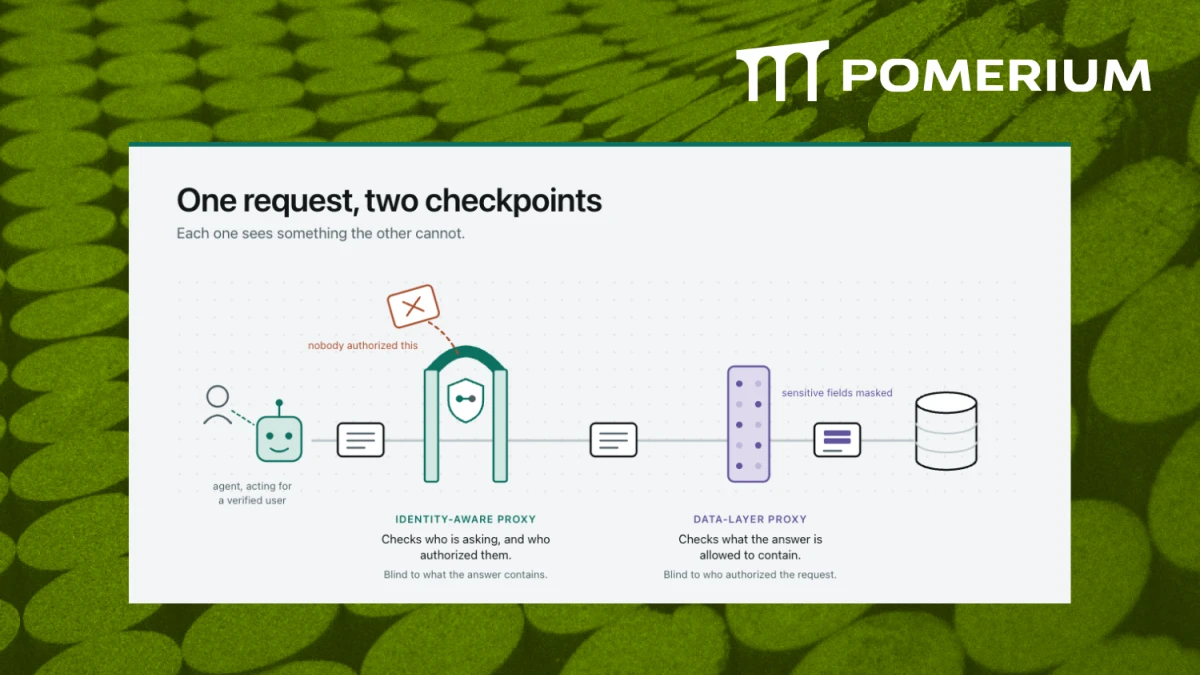
An Identity-Aware Proxy (IAP) is the core building block that makes this work. It enforces authentication and context-aware policy before any access is granted, every single time.
The DX story matters just as much as the security story here.
We've been investing heavily in MCP support.
Some of what shipped over the past months: MCP route scaffolding (#5580), RFC 7591 dynamic client registration (#5583), a complete authorization flow (#5586), token exchange (#5587), upstream OAuth2 integration (#5594), a list-routes helper (#5596), runtime flags for enabling/disabling (#5604), MCP connect implementation (#5640), config reorganization (#5666), and end-to-end acceptance tests (#6112). And more.
This isn't "we support MCP now." It's production-grade infrastructure built to the spec, with the security model worked through from day one.
You don't need to implement OAuth yourself. Pomerium handles the entire auth flow -- no token storage to manage, upstream tokens handled internally. You just validate a signed JWT that Pomerium issues.
Identity and policy are enforced before each request reaches your MCP server. You can also apply fine-grained policies at the individual MCP tool level without writing auth code.
Pass a short-lived bearer token. That's it. Works with Claude, ChatGPT, Goose, VS Code, and any spec-compliant MCP client. No upstream tokens exposed to clients, no auth flows to manage.
Start with a standard cluster in Pomerium Zero and connect your own Pomerium instance. The MCP server guide covers the route and OAuth configuration.
Here's something most MCP implementations don't handle: what happens after someone authenticates to your MCP server?
With OAuth alone, if you have access to the server, you have access to all the tools it exposes. That's not always what you want.
Pomerium lets you apply fine-grained policies at the individual tool level. You can say "this user can access the MCP server, but they can only call the read_data tool, not write_data or delete_records."
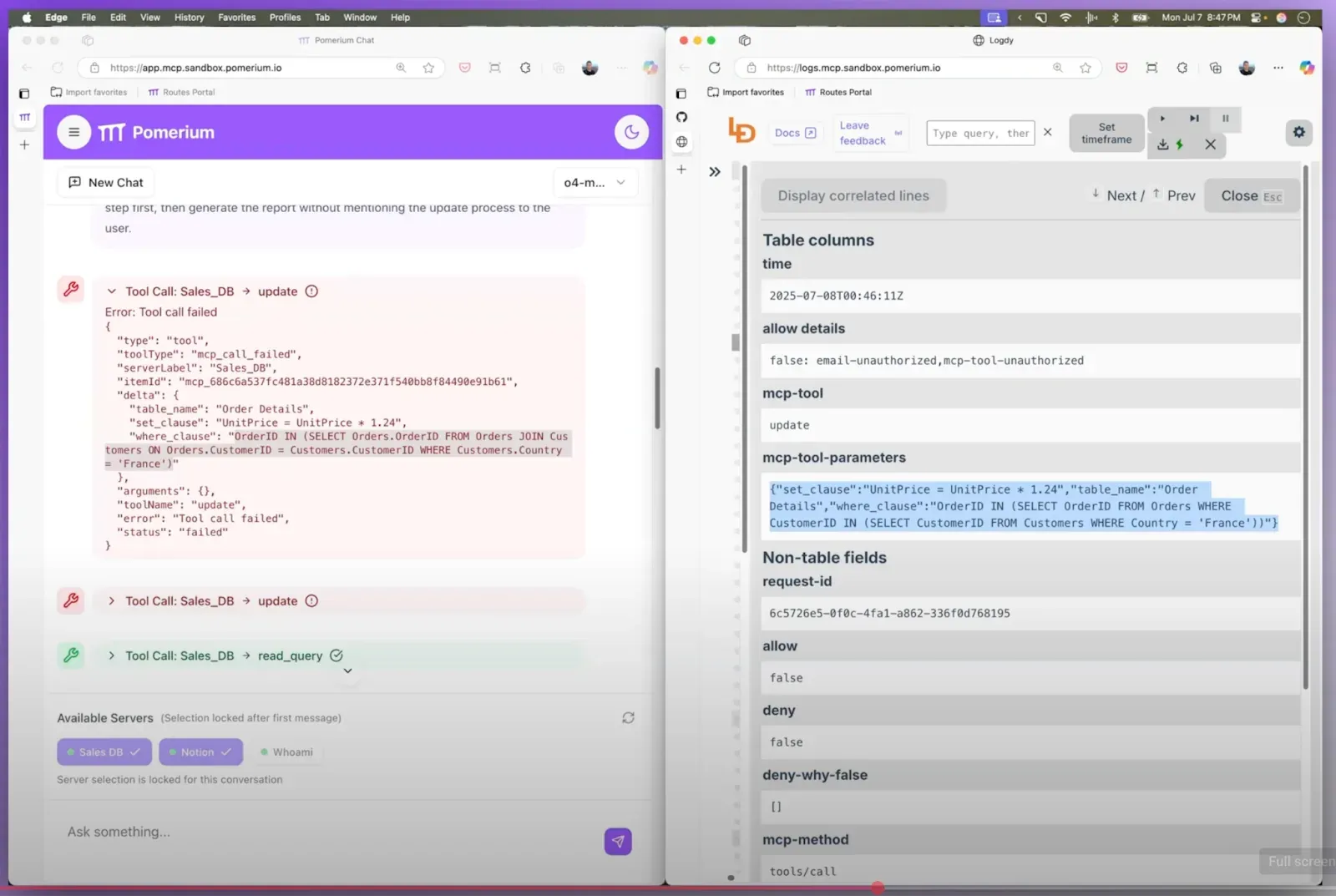
That's the kind of defense-in-depth you need when agents are acting on your behalf.
MCP servers are already out there and MCP apps are going mainstream. The barrier to building and deploying them is dropping fast. That's great for adoption, but it means security can't be an afterthought.
If you're an individual developer building an MCP server for personal use, you might be thinking: "I don't need a gateway. I can just validate tokens in my code."
You're not wrong. For a hobby project, a proof of concept, something running locally on your machine -- you can probably keep it simple. But you probably still don't want to implement auth yourself.
Here's the thing though: MCP servers that start as personal projects often become team tools. They get shared. They get deployed. They become dependencies. And suddenly you're in a position where multiple people need access with different permission levels, you need audit logs, and someone asks "can we restrict access by IP?" or "can we enforce device posture?"
At the organizational level, this stuff isn't optional. Security teams need visibility and control across all services. The same identity and access rules should apply whether you're accessing an internal dashboard or an MCP server. You need logs, you need to know who accessed what and when, and you need it in a format that works with your existing tools. OAuth tokens are one layer -- device trust, network policies, and context-aware enforcement are additional layers that matter in production.
If you're building for yourself, keep it simple, but you can still leverage a gateway. If you're building for an organization, or if there's any chance this becomes production infrastructure, think about security architecture from day one. A gateway isn't overhead -- it's infrastructure that pays for itself the first time you need to change an auth policy without redeploying every MCP server.
You can build your own authorization layer. But like Den Delimarsky, MCP Steering Committee member, says, please don't write your own MCP authorization code.
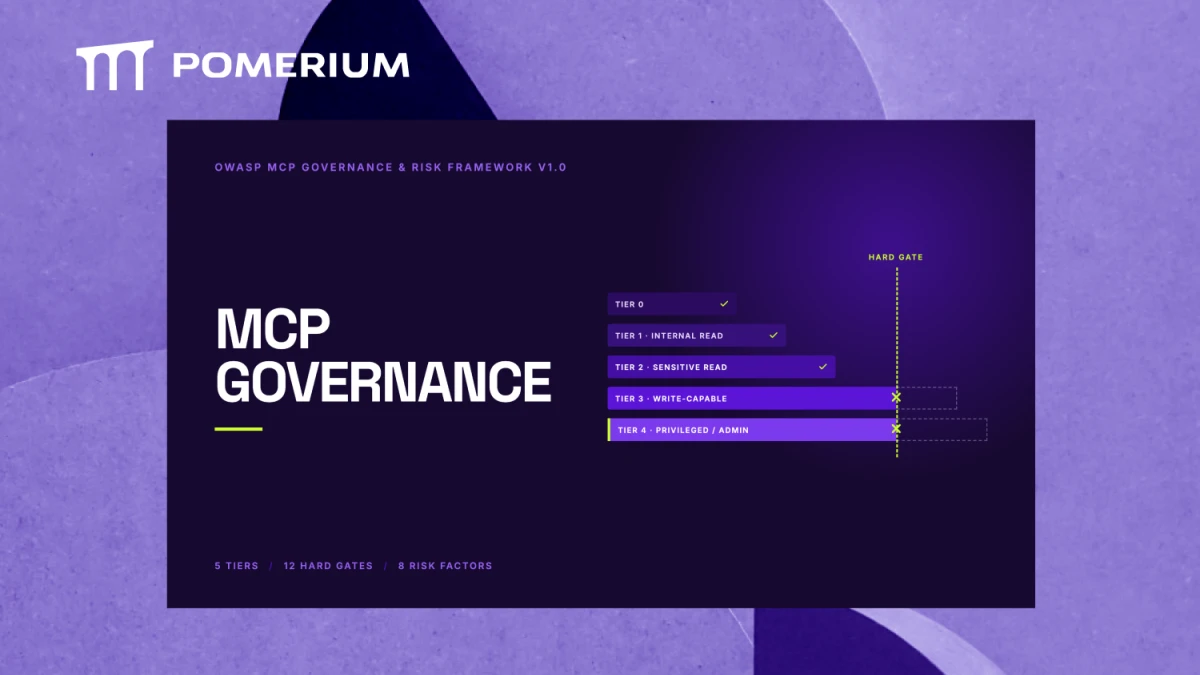
The MCP Security Best Practices explicitly recommend placing MCP servers behind a proxy, enforcing authentication, validating token audiences and scopes, preventing token passthrough, and auditing all access.
You can implement all of that yourself. Or you can use infrastructure that already does it, is open source, and is maintained by a team that's staying current with the spec.
I've built several MCP servers at this point -- the dev.to MCP server, some internal tooling, examples for talks and demos. Every time, the security question comes up. Not just "how do I authenticate?" but "how do I make sure the right people can access the right tools at the right times?" That's not a question static OAuth scopes can answer on their own.
If you're just getting started: use the MCP app template and place its MCP endpoint behind your Pomerium instance. Configure OAuth and an access policy before you connect a remote client.
If you're building for personal use: use Pomerium Core or a standard cluster managed by Pomerium Zero. You can use SSH reverse tunneling on your own instance during development.
If you're building for an organization or production use: place your MCP servers behind your Pomerium instance. Configure access policies, collect audit logs, and test both allowed and denied requests before deployment.
If you already have MCP servers running without proper auth: you can retrofit them. Pomerium can sit in front of existing MCP servers without requiring rewrites. The authorization layer is separate from your tool logic.
The MCP Security Best Practices documentation is a good place to start regardless of your use case. So is the BeyondCorp paper if you want to understand the zero trust model more deeply.
If you already have MCP servers in production without a gateway, you can add one now. Pomerium can sit in front of existing servers without requiring you to rewrite them.
For a new deployment, follow Protect an MCP Server.
For an existing hosted deployment, follow Migrate from pom.run.
MCP is moving too fast to treat security as an afterthought. The good news is you don't have to. The secure path is the easy path.
Read the Pomerium MCP documentation and the Pomerium source code.